Instagram Live Call to Action Ideas: Convert Viewers to Leads (2026)
You go live, the viewer count climbs to 500, you drop your best pitch… and then you say, “Check the link in my bio!”
Suddenly, you’re down to 300 viewers!
That’s the “leaky bucket” problem in action. You didn’t lose them because your offer was weak; you lost them because your Instagram Live call to action forced them to leave the stream. Every extra click adds friction, and friction kills conversions.
You don’t need to improve your script; you need to change your process for making offers. Keep your audience engaged with your live video by providing them with a private, instant direct message that includes a link, .PDF file, a checkout page, a booking form, etc. Eliminating barriers will increase the chances of retaining your audience for longer periods and growing sales. A strong Instagram Live call to action is now the difference between viewers who watch and viewers who buy.

By using the Comment to DM strategy, Live Shopping will be more popular among coaches, creators, and companies in 2026.
Why “Link in Bio” is the Worst CTA for Live Streams
Every time you say “link in bio” during a Live, three things instantly die:
Retention: A minimum of 50% of your live viewers will leave within 30 seconds of the live stream starting.
Reach: Due to the mass exit of viewers from the live stream, Instagram will stop promoting your live stream.
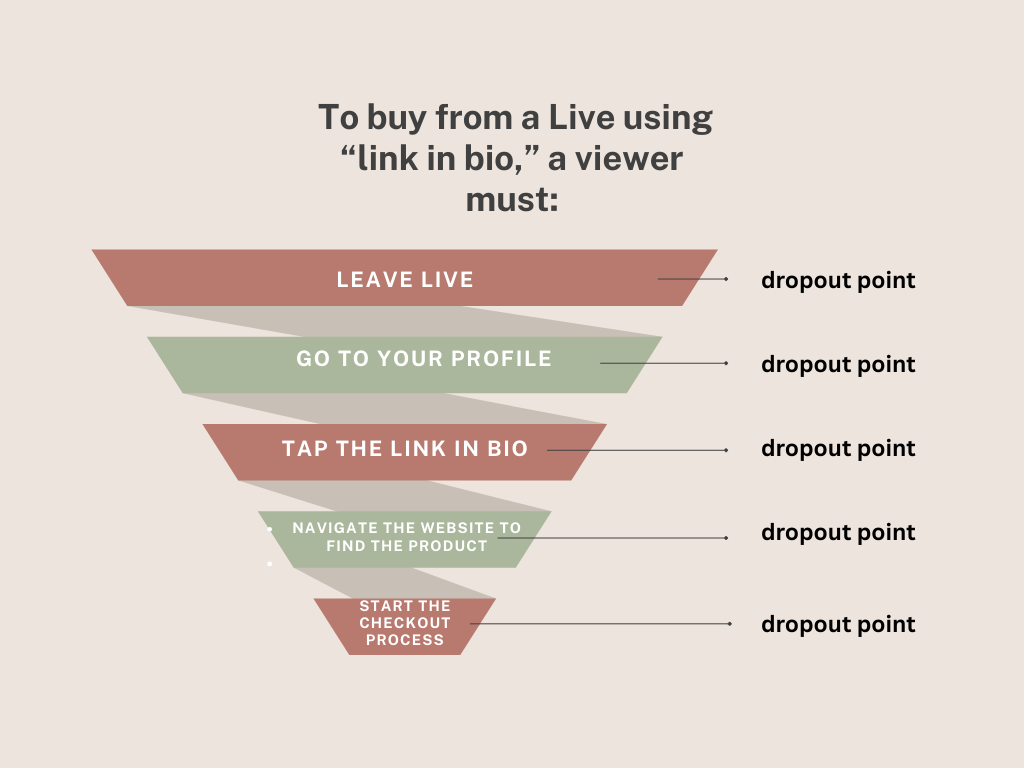
Conversions: You’re sending potential buyers through a sequence of “clunky” (5-6) steps to buy something. Our real-world testing has demonstrated that we see 70%-80% of potential buyers drop off through our funnel because of this.
Plus, you can only have one pinned link on your Profile at a time. If you were hoping to promote three products, a Lead Magnet, and a Multi-Offer in the same Live, you will have a difficult time with that. The “Link in bio” concept was relevant in 2018. In 2026, it appears to be the fastest way to leave your money behind. Most creators underestimate how much a weak call to action on Instagram Live limits their sales.
Resont ensures you captivate every audience member during your live streams by delivering the perfect checkout link, PDF, or calendar invite directly into their DMs without any effort whatsoever based on one quick keyword entry.
There’s no barrier or ‘friction’ whatsoever. Conversions are between 15% and 30%. And your algorithm loves it. An explosion of sales!
Why “link in bio” kills conversions?
Every extra step makes it harder to convert Live viewers to customers.
1. It creates friction
Viewers must: close the video → go to your profile → find the link → tap → wait for it to load.
That’s 4–5 steps. Most people drop off at the first one.
2. It hurts the Instagram algorithm
Instagram rewards watch time and in-video engagement. Sending people away tanks your retention — and your future reach.
3. You can only pin ONE link
The solution?
Conversational commerce that happens entirely inside the Live itself. Conversational commerce flips the old “push” model on its head. Instead of pushing people out of the stream and hoping they come back, you pull the entire buying journey into the chat and DMs, where Instagram actually wants the action to happen.
The sale (or lead capture) is now complete, while they keep watching you talk. No broken momentum, no FOMO lost, no retention drop.
Instagram loves this because:
- Watch time stays high
- Comments explode (great for the algorithm)
- People stay inside the app the entire time
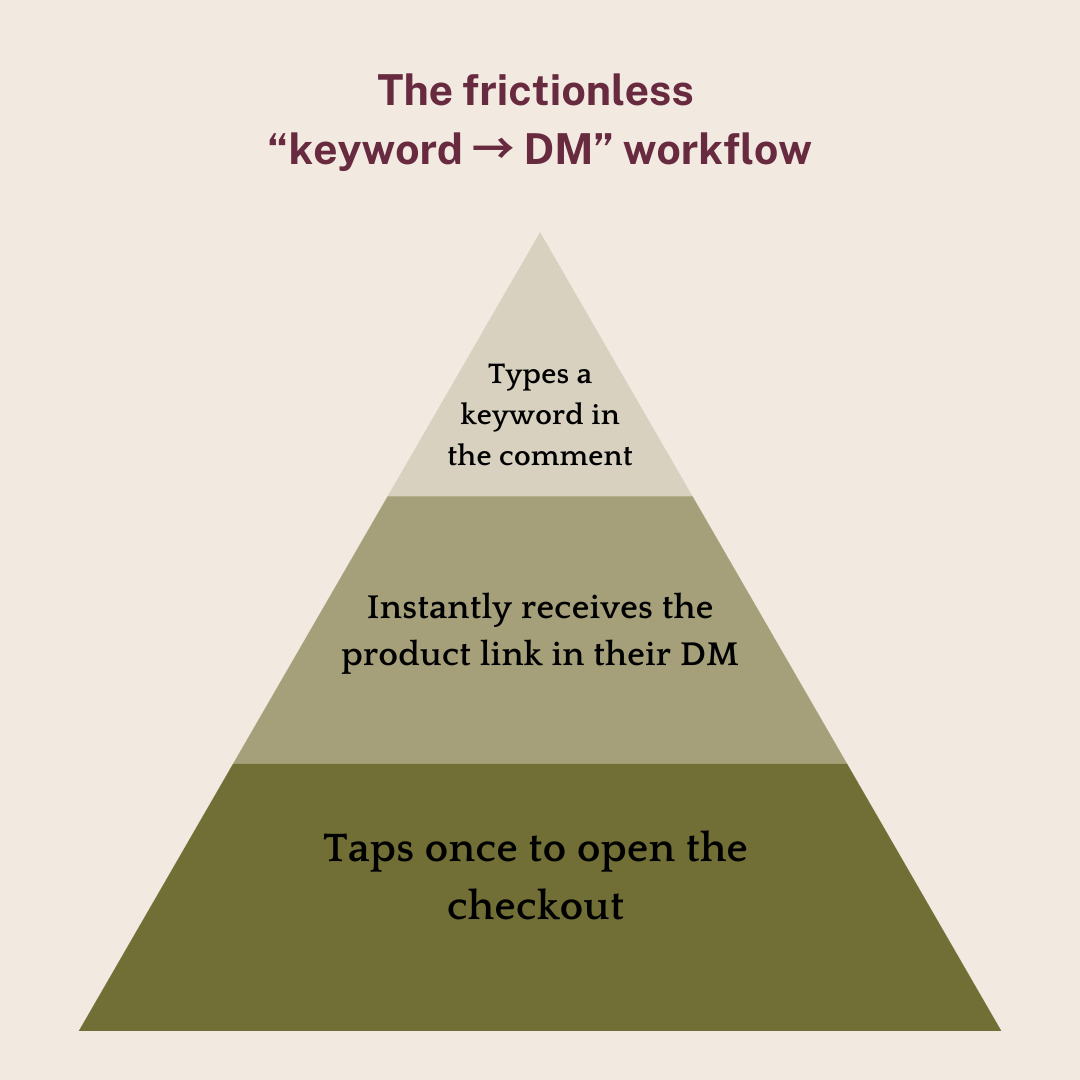
This approach aligns with the way Instagram ranks Live content today: retention rate, comment velocity, and viewer actions. Comment-to-DM automations create a mini live shopping funnel, combining engagement, direct message marketing, and instant offer delivery without breaking the viewer flow.
The “Comment-to-DM” Strategy (The Golden Standard)
Bridging the Gap Between Your Live Stream and Product Sales
Comment-to-DM acts as the bridge between attention and your offer. Instead of asking viewers to leave the Live or hunt for a link, you move the product directly to them. One comment = one instant DM with the offer. No redirects, no drop-off, no friction. During Instagram Live shopping, your call to action must be instant, simple, and frictionless.
How It Works
When a viewer comments a specified keyword, the automation will instantly send them the correct link in their DM with no issues related to leaving the live stream or an algorithm misalignment. With Resont, you can set up unlimited keyword triggers in one account. Tell them: ‘Comment SHOES for the sneaker link, HAT for the cap, BUNDLE for both’, Resont detects the exact word and fires the correct DM while you never stop talking.
Sell Multiple Products in One Live (Without Choosing Just One Link)
With Multiple Rule Logic, it’s easily possible to sell multiple products all in one live-stream session without needing to change the pinned link for each offer.
For example, you can create two separate “rules” in your automation, one for your workshop checkout page and one for your waitlist opt-in page. Then, if someone comments with “Workshop,” Rule A will trigger and automatically send them the workshop checkout page link. Similarly, if they comment with “Waitlist,” they will receive the link for their waitlist email signup page.
The Beneficiaries
You maintain high levels of viewer engagement (high viewer retention) while giving your audience two personalized checkout links that will reside safely within their Direct Messages until they’re ready to purchase from you….meaning there will be no extra steps for converting viewers into customers!
5 High-Converting CTA Scripts for Instagram Live
Here are the exact word-for-word scripts that top Resont users are running right now. They’re battle-tested to deliver 15–30 % viewer-to-buyer conversions because they combine urgency, simplicity, and zero friction. Just swap in your own keywords and use them today. This is currently the strongest call to action on Instagram Live because it keeps viewers inside the stream.
1. E-commerce Flash Drop (creates instant FOMO)
“We only have 10 of these left at this price, and they’re moving fast. Comment BUY right now, and I’ll send the secret checkout link straight to your DMs in seconds!”
2. Lead Magnet for Coaches & Creators (perfect for trainings)
“I put together a full PDF cheat sheet + resource list from everything I just taught. Want it? Comment GUIDE below and I’ll slide it into your DMs instantly.”
3. Segmented Offers (uses Resont’s unlimited rules feature)
“Comment START if you’re a complete beginner and want my starter program… or comment PRO if you’re ready for the advanced masterclass. My Resont automation will send you the exact right link immediately.”
4. Discovery Calls / Applications (high-ticket coaches love this)
“I have 5 spots left this week for 1-on-1 strategy calls. Want one? Comment CALL and I’ll DM you my calendar link privately, first come, first served.”
5. Mystery Discount / Gamification (spikes engagement)
“Comment DEAL in the next 5 minutes, and I’ll send you a discount code bigger than anything I’ve shown publicly today. You’ll get it in your DMs before I even reveal it here!”
Bonus 6th script (Resont users swear by this one):
“Comment MINE if you want this, I’ll send the link straight to your DMs so you don’t have to scramble later!”
Copy, paste, go live, and watch the comments (and sales) explode while your viewer count stays sky-high.
How to Set Up Unlimited Keyword Triggers in Resont in Under 4 Minutes
The Instagram Live comments trigger turns a simple word into an automated DM that delivers the product link instantly. with Resont you simply can prepare your live for selling you products and services.
- Log in at app.resont.com
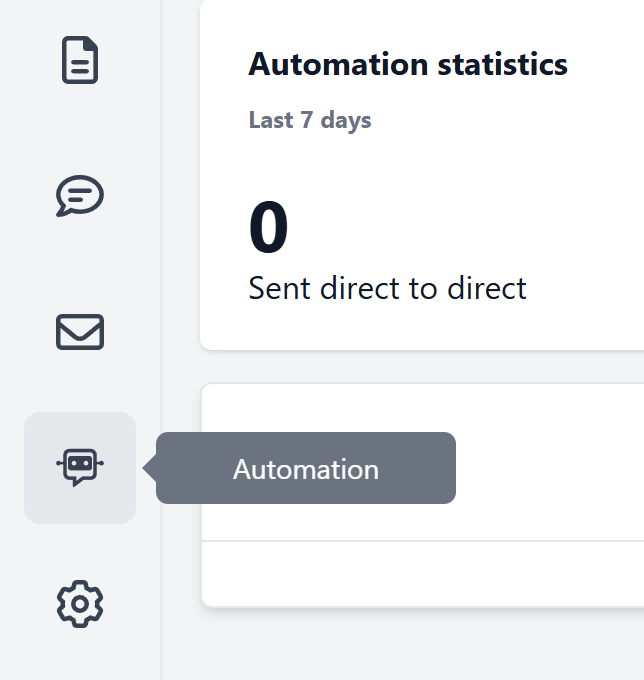
- Click Automation (Robot icon on the left sidebar)
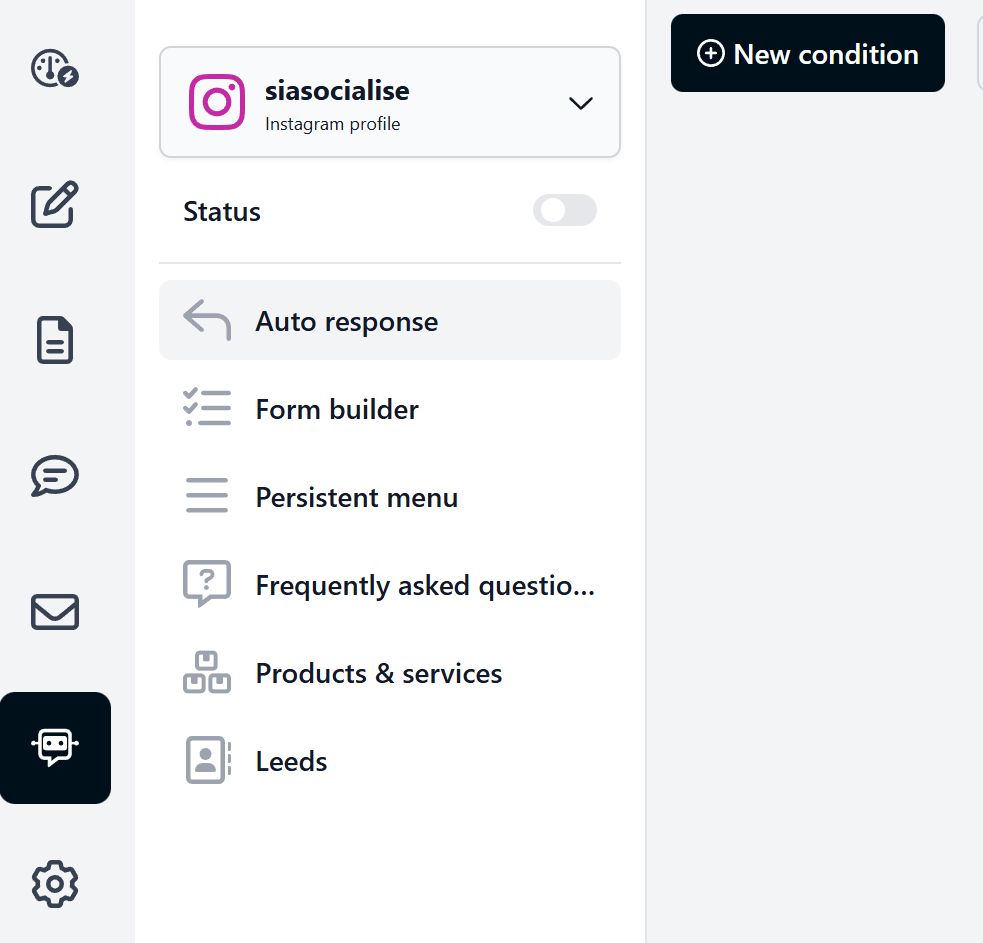
- Hit the black + New button → New condition
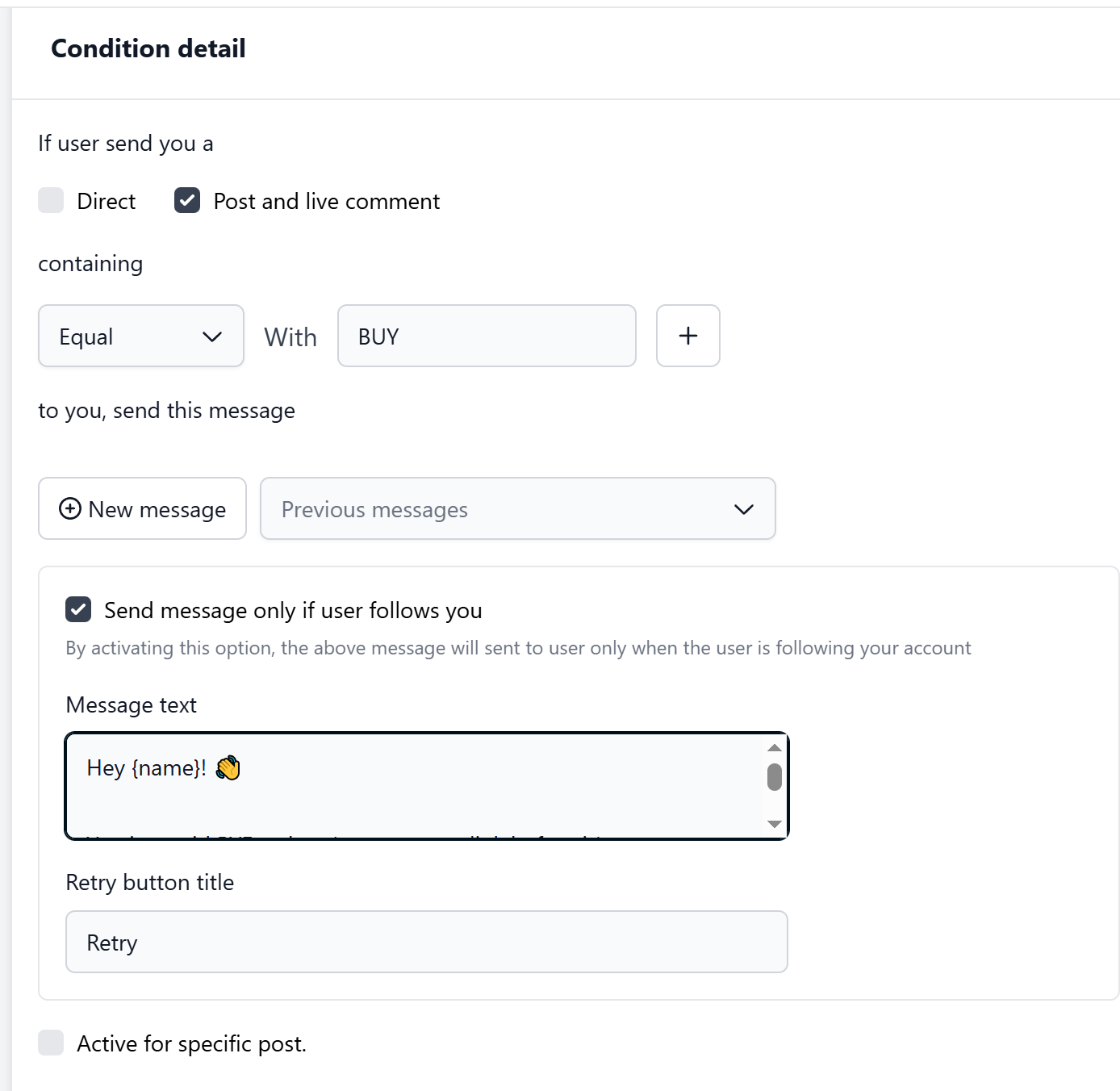
 4. In the new window that opens:
- Make sure Post and live comment are checked (this is what makes it work on Lives + Reels)
- Set the condition to Containing → Equal → With Value
- Type your keyword exactly as you want it detected (e.g., BUY, GUIDE, SHOES, DEAL)
- Always check the “Send message only if user follows you” box, as Instagram is very strict in 2026, which prevents your account from getting flagged or shadow-banned.
- (Pro tip: Resont is not case-sensitive and automatically catches common typos)
- In the Text Message, write your actual DM here. Example for keyword BYE
- For the Retry button title, you can change “Retry” → type “Resend Link” or “Send Again”. If Instagram temporarily blocks the DM, they can tap this button to try again
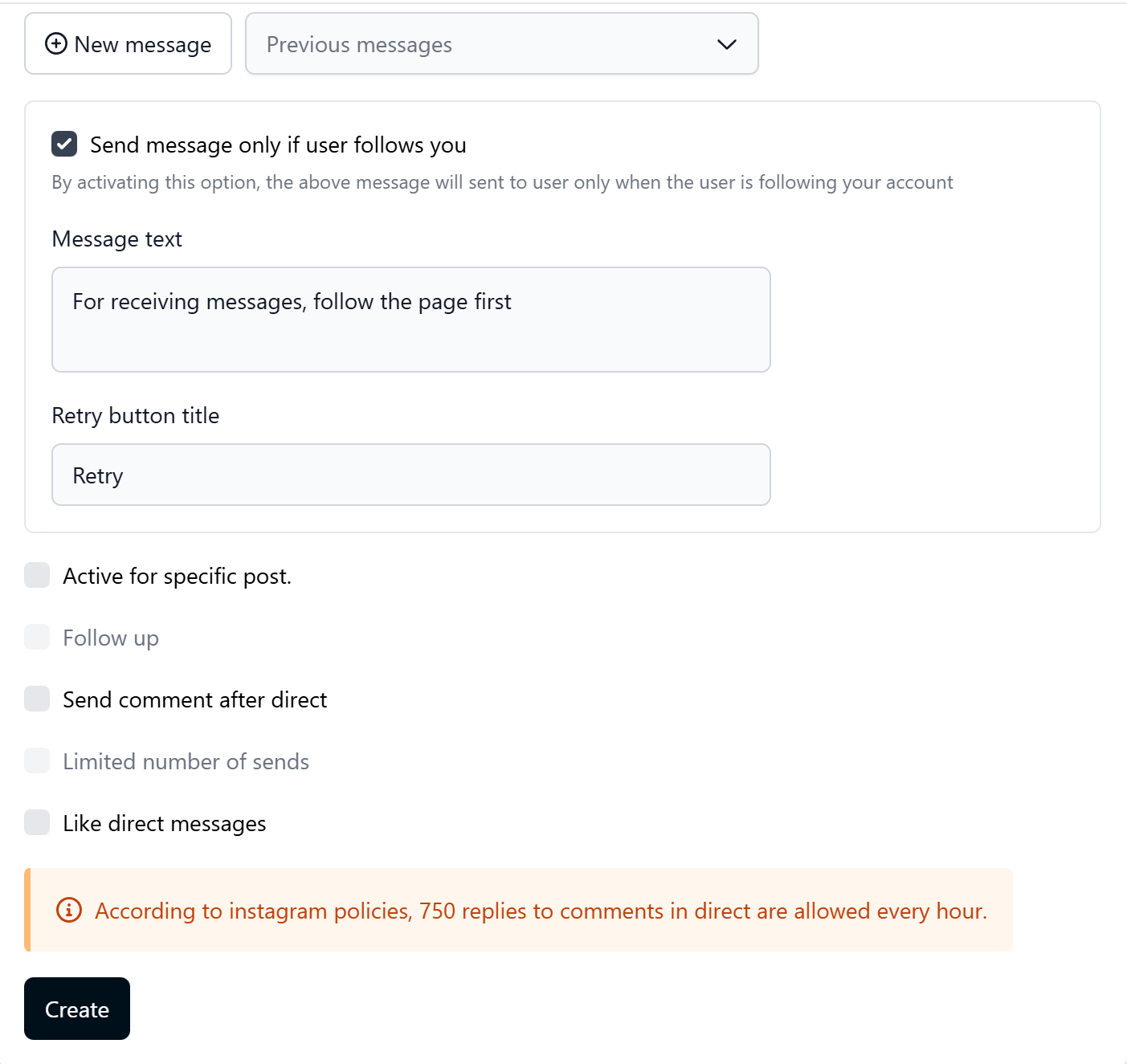
- Active for a specific post, check only if this offer is only for today’s Live/Reel
- Leave unchecked for evergreen rules
- Follow up Leave unchecked (unless you have a sequence)
- Send a comment after direct Leave unchecked
- Limited number of sends. Leave unchecked
- Like a direct message, leave unchecked
- When you’re done → scroll down and hit the blue Create button.
- Click New message (or “Previous messages” if you want to reuse one) → A clean message editor opens
Write your greeting (you can use {name} to personalize)
- Paste your link, add emojis, discount code, etc.
- Click Add button if you want clickable buttons (“Shop Now”, “Claim Discount”, etc.)
- Optional: switch to the Button, File, Image, Voice note, Video, or Product list tabs to make your DM even richer
Visual Reinforcement (Never Skip These)
The best spoken CTA in the world still fails if people don’t see it.
Even with Resont handling the automation perfectly, you still have to make the keyword impossible to miss. That’s why every top-performing Live in 2026 uses these three visual layers together, no exceptions.
The Pinned Comment (Your #1 Weapon)
As soon as you go live, post and pin this comment (it will stay at the top forever):
- “Comment BUY → checkout link sent instantly.”
- “Comment GUIDE → free PDF in your DMs.”
- “Comment SHOES | HAT | BUNDLE → get your link!”
Late joiners see the instructions in under 2 seconds. No scrolling required.
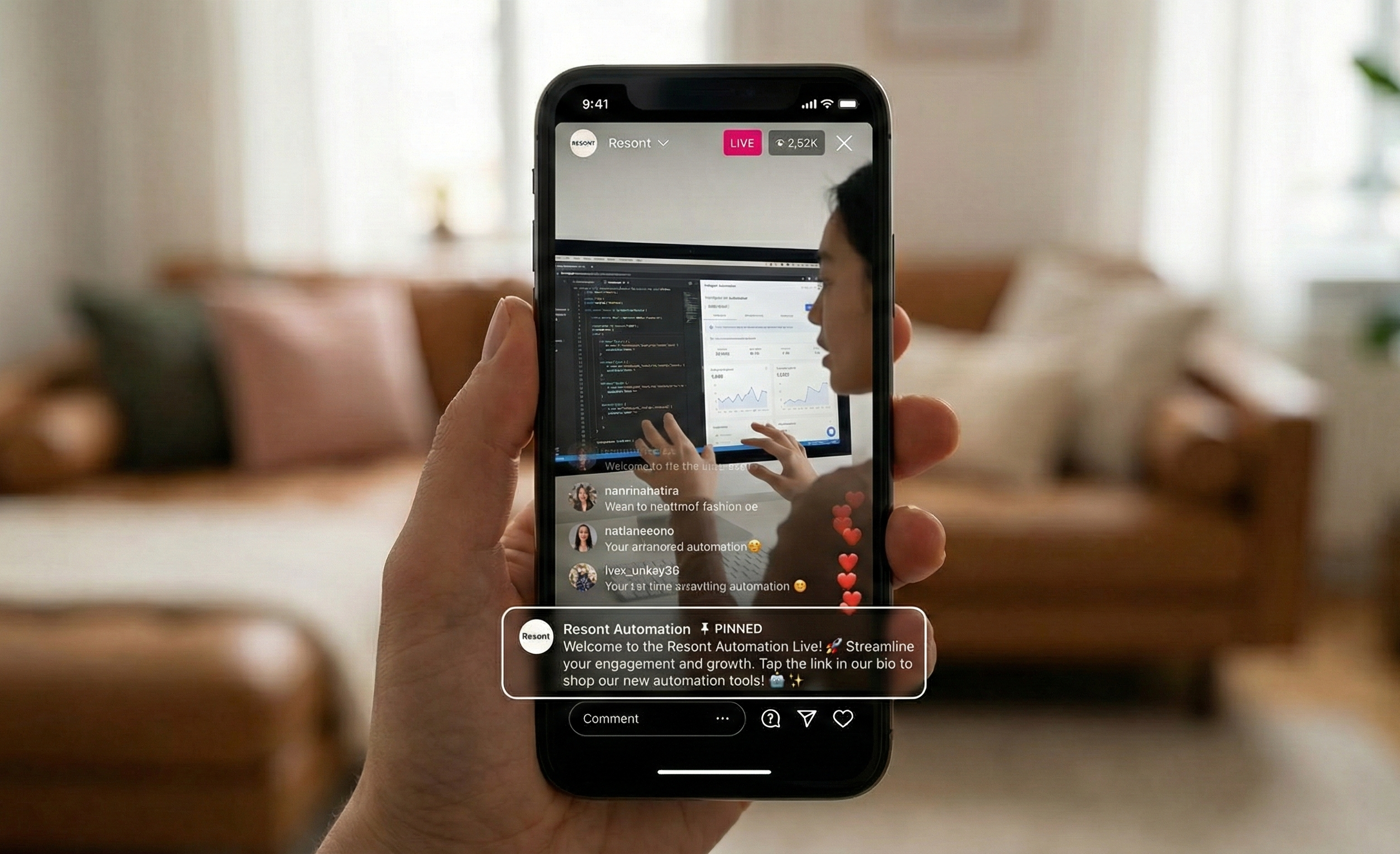
On-Screen Text & Stickers (Make It Scream)
If you’re using Instagram Live slides, text stickers, or the question sticker box, put the keyword in giant bold letters with a downward arrow:
- TYPE “BUY” BELOW 👇
- Comment DEAL for secret discount
- START or PRO? Comment now!
Add a countdown timer sticker for extra urgency, Resont users see comment volume double the moment the timer appears.
Repetition (The 7-Minute Rule)
People join late. Phones buzz. Attention drifts.
Repeat your full CTA every 5–7 minutes without fail.
Quick script the pros use:
“If you’re just joining us, comment BUY right now, and I’ll shoot the link straight to your DMs so you don’t miss this!”
Pinned comment + on-screen text + regular repetition = the unbreakable visual trifecta that turns passive viewers into instant buyers while your viewer count keeps climbing. Skip any one of them, and you’re quietly leaking sales.
FAQ: Instagram Live CTAs
Can you put clickable links in Instagram Live comments? No. Instagram does not allow clickable links in Live comments. This makes “typing the URL manually” or “go to my bio” extremely inefficient. The highest-converting workaround is using Comment-to-DM automation, which sends the clickable link straight to the viewer’s inbox without interrupting the Live.
How often should I say my Call to Action during a Live?
Repeat your CTA every 5–10 minutes. Viewers join, leave, and rejoin constantly, so many will miss your first explanation. Combine spoken repetition with a Pinned Comment so the keyword instruction is always visible at the top.
What is the best keyword to use for Live automation?
Short, simple, typo-proof keywords work best — things like BUY, LINK, GUIDE, DEAL, or PRICE.
Avoid long or complex phrases, as spelling mistakes can stop your automation from triggering.
Does comment automation work on saved Live replays?
Yes. When you save your Live to your profile (as a Reel or Video), keyword automation will continue to work. Viewers who comment on the trigger word days or even weeks later will still receive the correct DM.
Why is “link in bio” a bad CTA on Instagram Live?
Because it forces viewers to leave the Live. This instantly drops retention, hurts the algorithm, and reduces conversions. Modern Live selling strategies focus on keeping viewers inside the stream while delivering the link privately via DM.
Does Comment-to-DM actually increase conversions?
Yes, most creators and brands see 15–30% viewer-to-buyer conversion rates because the entire buying journey happens inside the Live. No drop-offs, no extra steps, no friction.
Can I promote multiple products in one Instagram Live?
Absolutely. With automation tools that support multiple keyword rules, you can offer several products at once:
“Comment SHOES for sneakers.”
“Comment HAT for today’s cap.”
“Comment BUNDLE for both”
Each keyword triggers a different DM, without ever changing your pinned link.
Will Instagram flag my account for using automation?
No — as long as your automation is triggered by viewer comments, not unsolicited DMs. Always enable “send message only if user follows you” to stay perfectly aligned with Instagram’s 2026 safety rules.
Do CTAs work for small Instagram accounts?
Yes. Comment-to-DM is effective whether you have 20 viewers or 2,000, because it maximizes the percentage of people who take action. Even small audiences convert well when friction is removed.
What types of offers perform best with Instagram Live CTAs?
These tend to convert extremely well:
Flash sales and limited stock items
Free PDFs, checklists, and guides
Workshop tickets and webinar sign-ups
Coaching calls or application links
Discount codes and product bundles
Anything urgent, exclusive, or time-sensitive gets the fastest response.
Your Next Step in Mastering Instagram Live CTAs
In 2026, Instagram Live is no longer about speaking to your audience but rather about developing sales through engagement with your audience together. The people who are currently winning in this space (creators, coaches, brands) have realised one key thing: the future of Live Shopping is interactive rather than passive, and it’s going to be easier for audiences when we can eliminate friction, keep users within the Live stream and allow for automation to assist in easing the strain of conversion from one to many. Mastering your Instagram Live call to action is the fastest way to turn your audience into real customers.
Key Takeaways
The phrase “link in bio” is going to be something of the past; however, if used correctly, it can kill retention, reach, and revenue.
Automatically delivering instant, private links through a comment-to-DM approach allows the user to remain inside the Live stream whilst instantaneously providing them with a link to purchase.
Short, simple “trigger” words, e.g., BUY, GUIDE, or DEAL consistently generate the highest levels of engagement.
There are non-negotiable aspects to conversion; it will be imperative that brands implement visual reinforcement (i.e., pinned comments and on-screen text + repetition) if they want to drive conversion rates.
Brands that are investing in the conversational commerce sector today will be in the position of dominating Live Shopping by 2026.
Want to turn your next Live into a conversion machine?
Set up your first Keyword Trigger for free with Resont and see your viewer-to-buyer conversion rates skyrocket.